

Installing AerynOS
Create your partition layout
Section titled “Create your partition layout”For the easiest experience, we recommend using gparted which is included in the live environment.
- Load up gparted from the live environment.
- Create a gpt partition table on the drive you want to install AerynOS on.
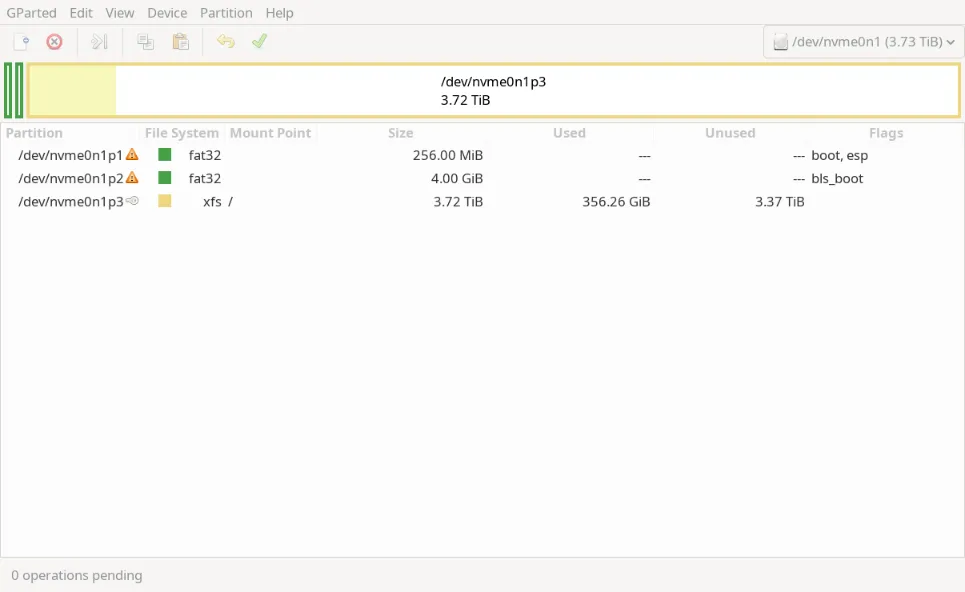
- Create a >=256mb FAT32 partition for ESP with the boot and esp flags
- Create a 4gb FAT32 partition for XBOOTLDR with the bls_boot flag
- Utilize the rest of the space for a xfs root partition
Once you have finished, your partition layout should look like this:
Install AerynOS
Section titled “Install AerynOS”From the app menu, select the “Install AerynOS” option. This is a shortcut to opening a terminal and running the following command:
sudo lichenFollow the instructions on the screen to complete your installation. You will be prompted to select your:
- Location
- Timezone
- Partition for ESP (and optionally XBOOTLDR)
- Partition for root
- Admin password
- User name
- User password
- Filesystem type for root partition
- Desktop environment
If you follow all the steps above, lichen will download the packages from our repository and install the latest version of AerynOS onto your system. Once completed, you can reboot your system and enjoy your new AerynOS installation!